Umbrella Crowd Street Scene by Prompt Craft
Depict an introspective street scene surrounded by black umbrellas with a yellow focal point by Prompt Craft.
Subject: Use reference image as subject [do not write anything in subject except that line].
 Subject Appearance and Pose
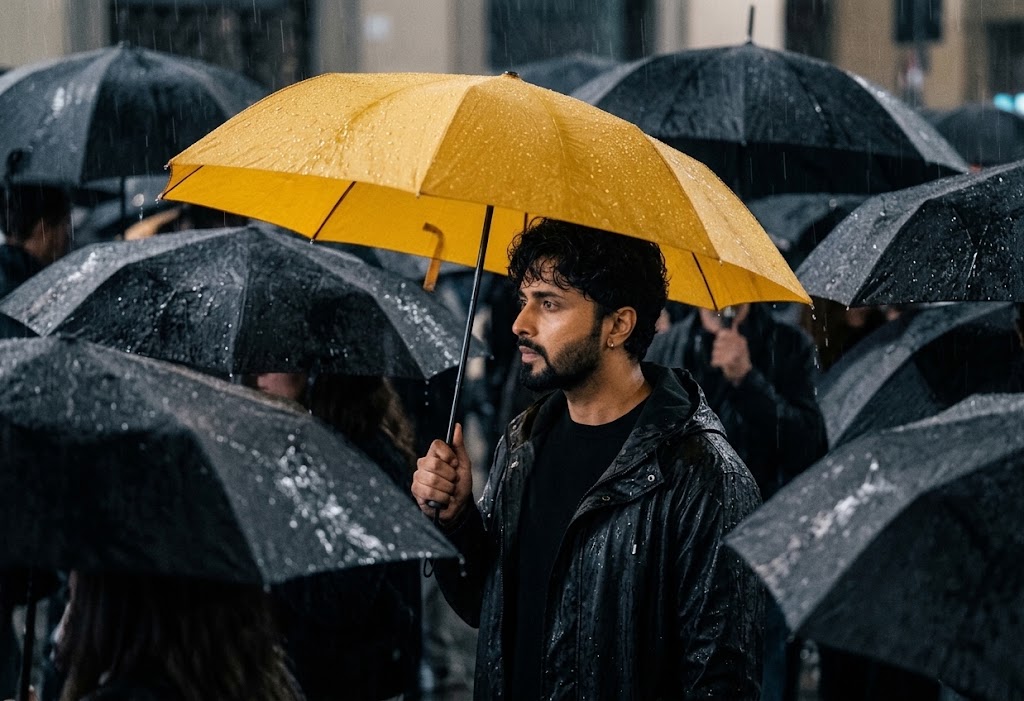
 The Subject, identical to the individual from the uploaded reference image, is captured in a waist-up profile view facing toward the left. The Subject has dark, wavy, damp hair loosely swept across the forehead and exhibits a quiet, introspective facial expression. The Subject is holding the thin metal shaft of an open umbrella with one hand, standing surrounded by a moving sea of other people.
 Attire and Props
 The Subject wears a dark black hooded rain jacket over a simple black inner crew-neck garment, both showing rain-slicked wet textures. Overhead, the Subject holds an open, vivid yellow umbrella covered in fine raindrops, creating a striking visual contrast with the rest of the dark composition.
 Environment and Crowd
 The setting is a densely packed crowd on a rainy city street. The Subject is completely enveloped by numerous overlapping black umbrellas held by indistinct figures in the immediate foreground, background, and sides. Beaded water droplets glisten across every wet umbrella canopy under the dark, overcast ambiance.
 Composition and Lighting
 A medium close-up, eye-level framing with the Subject placed near the center, slightly framed from below by rain-soaked black umbrellas in the foreground. The lighting is low-key, moody, and diffused, reflecting subtly off wet nylon fabrics, droplets, and the Subject's skin to sculpt their profile against the dark backdrop.
 Color Palette and Photographic Style
 Cinematic street photography utilizing selective color contrast. The entire scene is rendered in monochromatic deep blacks, slates, and charcoal tones, punctuated solely by the saturated, warm yellow hue of the Subject's umbrella. The atmospheric depth is heightened by falling rain streaks, shallow depth of field, and fine film grain.
 Preserve the subject's identity with absolute fidelity to the reference image, maintaining 100% facial and anatomical likeness. Keep all facial features, expressions, age, ethnicity, skin tone, hair, and unique details such as moles, scars, freckles, and natural asymmetry exactly unchanged. Retain the original body proportions, posture, skeletal structure, muscle distribution, and biometric characteristics without any modifications. Do not beautify, stylize, smooth, age, de-age, or replace the face with a generic AI appearance. Ensure pixel-level structural accuracy with the reference image, making it the highest priority while preserving every defining physical characteristic.
Try this prompt in
How to Use This Prompt
Umbrella Crowd Street Scene by Prompt Craft is a ready-to-use AI image prompt designed for creative ai art who want consistent, high-quality results without spending hours on trial and error. Depict an introspective street scene surrounded by black umbrellas with a yellow focal point by Prompt Craft.
Use this prompt whenever you need polished visuals for creative ai art workflows — typical moments include client work, content production, classroom prep, and rapid iteration on ideas. Copy the full prompt, paste it into your preferred AI tool, and replace any bracketed placeholders with your own specifics (topic, brand, subject, or constraints).
For best results, give the model a clear context line before pasting, keep your replacements concrete (numbers, names, examples), and regenerate 2–3 variations to pick the strongest composition. Pair it with the customization tips below to adapt it to your exact use case.
Example Output
Expect a sharp, well-composed image with clean subject framing, balanced lighting, and crowd street photography, rainy day aesthetic details suitable for direct use in social posts, thumbnails, or product mockups.
Close portrait of a person with a bright yellow umbrella standing amidst a dark sea of black umbrellas.
Prompt Details
Customization Tips
- Swap the subject for your own — replace the main noun with your product, character, or scene.
- Change the lighting (golden hour, studio softbox, neon night) to shift the mood.
- Add a specific camera or lens reference (e.g. "shot on 35mm, f/1.8") for a photo feel.
- Lock the aspect ratio to match your platform (9:16 for Reels, 16:9 for YouTube).
- Add or remove a style modifier like "cinematic", "minimalist", or "editorial".
- Specify a color palette in hex or named colors to match your brand.
- Append "no text, no watermark" to keep outputs clean.
- Use negative prompts (e.g. "no blur, no extra fingers") if your model supports them.
Frequently Asked Questions
What is the "Umbrella Crowd Street Scene by Prompt Craft" prompt used for?
Depict an introspective street scene surrounded by black umbrellas with a yellow focal point by Prompt Craft.
Which AI model works best for crowd street photography?
Nano Banana Pro (Gemini 3 Image) handles this prompt best today; Midjourney v7 is the strongest alternative if you already pay for it, and Flux.2 Pro is a solid free-tier fallback.
Is the Umbrella Crowd Street Scene by Prompt Craft prompt free?
It costs nothing here. Copy it, adapt it, ship it — personal or commercial use is fine.
Can I sell or publish images made with this crowd street photography prompt?
Usually yes, but rights come from the image tool, not from us. Paid tiers of Nano Banana Pro (Gemini 3 Image) and Midjourney v7 currently grant commercial use — check their live terms before a paid client delivery.
Why does my result look different from the example?
AI models sample randomly, so two runs of the same prompt rarely match. Generate three, keep the best, and refine that one with a short follow-up.
Reviews(0)
Related prompts