Tech & VFX Comparison – "AI / VFX" | Ai Vs Vfx Comparison Youtube Thumbnail AI YouTube Thumbnail Prompt
A ready-to-use, professionally composed AI vs VFX comparison YouTube thumbnail prompt (No. 23) for creators who want a high-CTR (click-through-rate), scroll-stopping design. A split-screen comparison YouTube thumbnail comparing two visual styles. Every subject, headline, and color placeholder in the prompt is fully editable, so you can swap in your own photos and video title to generate a custom, SEO-optimized YouTube thumbnail with tools like Midjourney or other AI image generators — built to increase views, watch time, and subscriber growth.
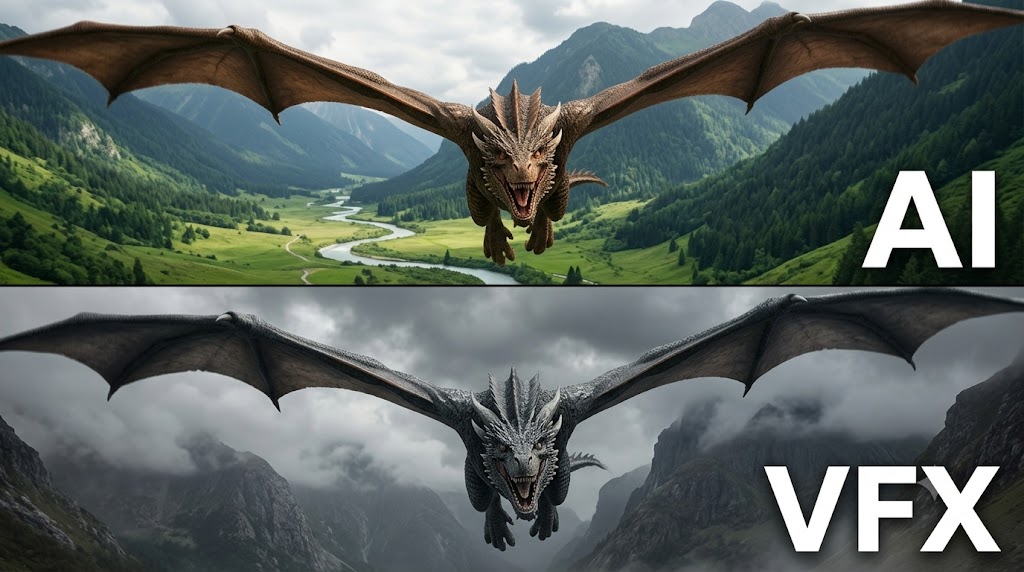
A split-screen comparison YouTube thumbnail comparing two visual styles. The top half shows a realistic fantasy dragon with wide brown wings flying directly towards the camera over a lush green mountain valley with a winding river under a bright overcast sky, with bold white uppercase text reading "AI" on the right side. The bottom half shows the same dragon with dark grey wings flying over a foggy, overcast mountainous landscape with dramatic clouds, with bold white uppercase text reading "VFX" on the right side. Split horizontal layout, high contrast, cinematic CGI comparison, hyper-detailed, 8k.
Try this prompt in
How to Use This Prompt
Tech & VFX Comparison – "AI / VFX" | Ai Vs Vfx Comparison Youtube Thumbnail AI YouTube Thumbnail Prompt is a ready-to-use AI text prompt designed for youtube-thumbnail who want consistent, high-quality results without spending hours on trial and error. A ready-to-use, professionally composed AI vs VFX comparison YouTube thumbnail prompt (No. 23) for creators who want a high-CTR (click-through-rate), scroll-stopping design. A split-screen comparison YouTube thumbnail comparing two visual styles. Every subject, headline, and color placeholder in the prompt is fully editable, so you can swap in your own photos and video title to generate a custom, SEO-optimized YouTube thumbnail with tools like Midjourney or other AI image generators — built to increase views, watch time, and subscriber growth.
Use this prompt whenever you need reliable written output for youtube-thumbnail workflows — typical moments include client work, content production, classroom prep, and rapid iteration on ideas. Copy the full prompt, paste it into your preferred AI tool, and replace any bracketed placeholders with your own specifics (topic, brand, subject, or constraints).
For best results, give the model a clear context line before pasting, keep your replacements concrete (numbers, names, examples), and ask a short follow-up to refine tone or length. Pair it with the customization tips below to adapt it to your exact use case.
Example Output
Expect a structured, ready-to-use response covering VFX comparison thumbnail, YouTube thumbnail template, AI thumbnail prompt in a clear format you can paste straight into your workflow with only light edits.
Prompt Details
Customization Tips
- Replace placeholders with your actual VFX comparison thumbnail details for sharper, on-brand output.
- Set a target length ("respond in ~150 words" or "in 5 bullet points").
- Specify the audience reading level (beginner, expert, executive).
- Ask for the output in a specific format — table, JSON, Markdown, email.
- Add a tone instruction: friendly, formal, witty, persuasive.
- Chain a follow-up: "now rewrite for LinkedIn" or "make it 30% shorter".
- Constrain with examples — paste 1–2 samples of the style you want to match.
- Add a "do not" list to block common mistakes (no emojis, no fluff, no disclaimers).
Frequently Asked Questions
What is the "Tech & VFX Comparison – "AI / VFX" | Ai Vs Vfx Comparison Youtube Thumbnail AI YouTube Thumbnail Prompt" prompt used for?
A ready-to-use, professionally composed AI vs VFX comparison YouTube thumbnail prompt (No. 23) for creators who want a high-CTR (click-through-rate), scroll-stopping design. A split-screen comparison YouTube thumbnail comparing two visual styles. Every subject, headline, and color placeholder in the prompt is fully editable, so you can swap in your own photos and video title to generate a custom, SEO-optimized YouTube thumbnail with tools like Midjourney or other AI image generators — built to increase views, watch time, and subscriber growth.
Which AI model works best for VFX comparison thumbnail?
In 2026 testing, Nano Banana Pro (Gemini 3 Image) produces the cleanest results, with Midjourney v7 and Flux.2 Pro close behind. The wording is model-agnostic, so older versions still work.
Is the Tech & VFX Comparison – "AI / VFX" | Ai Vs Vfx Comparison Youtube Thumbnail AI YouTube Thumbnail Prompt prompt free?
It costs nothing here. Copy it, adapt it, ship it — personal or commercial use is fine.
Can I sell or publish images made with this VFX comparison thumbnail prompt?
Usually yes, but rights come from the image tool, not from us. Paid tiers of Nano Banana Pro (Gemini 3 Image) and Midjourney v7 currently grant commercial use — check their live terms before a paid client delivery.
Why does my result look different from the example?
Model updates and random sampling both shift results. Locking a seed (where supported) or repeating the run two or three times gets you closest to the example.
Reviews(0)
Related prompts