Disaster & Emergency Reporting YouTube Thumbnail AI Prompt | Flooded Street AI YouTube Thumbnail Prompt
Generate high-action emergency reporting YouTube thumbnails featuring flooded urban environments, heavy-duty pumps, and customized disaster gear reactions.
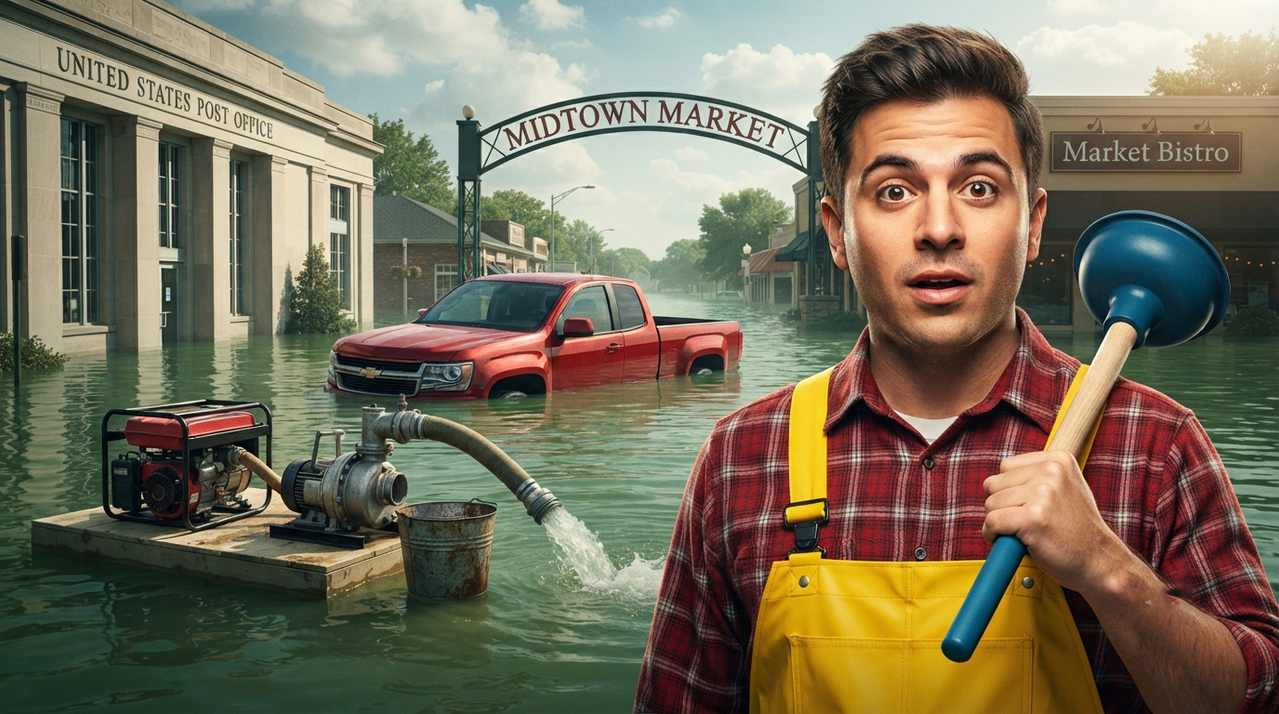
Subject Identity: Replace the subject in the foreground with [INSERT_YOUR_FACE_AND_UPPER_BODY_HERE]. This person should have a confident, slightly surprised expression and be holding a [INSERT_OBJECT_HERE, e.g., blue plunger] over their shoulder. They must be wearing the same [INSERT_CLOTHING_HERE, e.g., yellow-bib overalls over a red plaid shirt] as seen in the original image.
Scene and Composition: The background is a [INSERT_LOCATION_HERE, e.g., flooded suburban street] under a partly cloudy daytime sky. The scene is submerged in green floodwater. In the background, a [INSERT_VEHICLE_COLOR_AND_TYPE_HERE, e.g., red pickup truck] is half-submerged. To the left of the truck, a [INSERT_EQUIPMENT_TYPE_HERE, e.g., gasoline-powered generator] sits on a small floating platform, with a heavy-duty industrial water pump and hose system connected and actively pumping water. An old metal bucket is next to the pump.
Signage Details: All signage in the background must be clearly visible and legible. The building on the far left has the text "UNITED STATES POST OFFICE" on its upper facade. The archway sign over the street reads "MIDTOWN MARKET". The building to its right has a sign that says "Market Bistro". All text should be in the exact font style and position as the original image.
Lighting and Style: Professional cinematic thumbnail lighting, high-contrast, sharp focus on the subject, dramatic rim lighting separating subjects from the background. The overall tone is adventurous and slightly chaotic.
Aspect Ratio: Standard 16:9 YouTube thumbnail ratio.
Try this prompt in
How to Use This Prompt
Disaster & Emergency Reporting YouTube Thumbnail AI Prompt | Flooded Street AI YouTube Thumbnail Prompt is a ready-to-use AI text prompt designed for youtube-thumbnail who want consistent, high-quality results without spending hours on trial and error. Generate high-action emergency reporting YouTube thumbnails featuring flooded urban environments, heavy-duty pumps, and customized disaster gear reactions.
Use this prompt whenever you need reliable written output for youtube-thumbnail workflows — typical moments include client work, content production, classroom prep, and rapid iteration on ideas. Copy the full prompt, paste it into your preferred AI tool, and replace any bracketed placeholders with your own specifics (topic, brand, subject, or constraints).
For best results, give the model a clear context line before pasting, keep your replacements concrete (numbers, names, examples), and ask a short follow-up to refine tone or length. Pair it with the customization tips below to adapt it to your exact use case.
Example Output
Expect a structured, ready-to-use response covering Emergency Thumbnail, Disaster Prompt, Flood Scene in a clear format you can paste straight into your workflow with only light edits.
Prompt Details
Customization Tips
- Replace placeholders with your actual Emergency Thumbnail details for sharper, on-brand output.
- Set a target length ("respond in ~150 words" or "in 5 bullet points").
- Specify the audience reading level (beginner, expert, executive).
- Ask for the output in a specific format — table, JSON, Markdown, email.
- Add a tone instruction: friendly, formal, witty, persuasive.
- Chain a follow-up: "now rewrite for LinkedIn" or "make it 30% shorter".
- Constrain with examples — paste 1–2 samples of the style you want to match.
- Add a "do not" list to block common mistakes (no emojis, no fluff, no disclaimers).
Frequently Asked Questions
What is the "Disaster & Emergency Reporting YouTube Thumbnail AI Prompt | Flooded Street AI YouTube Thumbnail Prompt" prompt used for?
Generate high-action emergency reporting YouTube thumbnails featuring flooded urban environments, heavy-duty pumps, and customized disaster gear reactions.
Which AI model works best for Emergency Thumbnail?
Run it on Nano Banana Pro (Gemini 3 Image) first. If the result feels flat, try Midjourney v7 or Flux.2 Pro — each interprets Emergency Thumbnail slightly differently.
Is the Disaster & Emergency Reporting YouTube Thumbnail AI Prompt | Flooded Street AI YouTube Thumbnail Prompt prompt free?
Yes — it's free on PromptCraft, no account needed, and you can reuse it in client or commercial work.
Can I sell or publish images made with this Emergency Thumbnail prompt?
Usually yes, but rights come from the image tool, not from us. Paid tiers of Nano Banana Pro (Gemini 3 Image) and Midjourney v7 currently grant commercial use — check their live terms before a paid client delivery.
Why does my result look different from the example?
AI models sample randomly, so two runs of the same prompt rarely match. Generate three, keep the best, and refine that one with a short follow-up.
Reviews(0)
Related prompts